Guide
What are Claude Skills? A plain-English guide
A Claude Skill is a folder of instructions, and optionally scripts and files, that teaches Claude one specific, repeatable job. Claude loads it on its own when the conversation calls for it. Think of it less like a prompt and more like hiring Claude with training already done.

I build and ship products with Claude every week, and skills are the feature I lean on most, both as a user and as someone who sells one. This is the explanation I wish I'd had at the start: no jargon, and honest about the parts that need a paid plan.
What exactly is a Claude Skill?
Under the hood, a skill is a folder. At minimum it contains one file, SKILL.md, which holds a name, a description of when the skill should activate, and instructions for what Claude should do. It can also carry scripts (Python, for example) and assets (templates, reference files) that Claude uses while doing the job.
The important part is the "when." Claude reads the descriptions of every installed skill and pulls the right one in automatically the moment a conversation matches it. You don't invoke skills through a menu; you just talk, and the relevant training kicks in. Skills follow the open Agent Skills standard, so the same folder format is starting to work across other AI tools too.
How are Skills different from custom instructions or GPTs?
Three ways that matter in practice:
- Scope. Custom instructions apply to everything, all the time. A skill activates only for its job, so you can install a dozen without them stepping on each other.
- Capability. A skill can include working code. When a skill ships a Python script, Claude runs the actual script, which means deterministic output instead of the model improvising each time. That's a genuinely different class of tool from a saved prompt.
- Portability. A skill is a folder you can zip, sell, version, and install anywhere Claude runs: claude.ai, Claude Code, Cowork. Custom GPTs live inside one vendor's store.
How do I install a Claude Skill?
Two paths, depending on where you use Claude. Both require a paid plan, and skills that run scripts need code execution enabled in settings.
In claude.ai (covers Cowork too)
- Open Settings, then Skills, listed under Capabilities.
- Upload the skill as a ZIP file. The ZIP contains a folder with the
SKILL.mdinside. - Confirm code execution is enabled so the skill can run its scripts.
In Claude Code
Copy the skill folder into ~/.claude/skills/ to make it available everywhere, or into .claude/skills/ inside one project to keep it scoped. That's the entire install.
What can a Skill actually do? A worked example
The skill I ship is JotThread, and it's a clean example of the anatomy because it uses all three parts of the format:
- The instructions teach Claude a command grammar:
/jotcaptures a note or task from the recent conversation into a Markdown file, filed under the right project, with a one-line confirmation. - An asset, an HTML template, defines a board design pixel for pixel.
- A script reads the Markdown file and renders it into that template when you type
/thread, so the board looks identical every single time instead of being re-improvised.
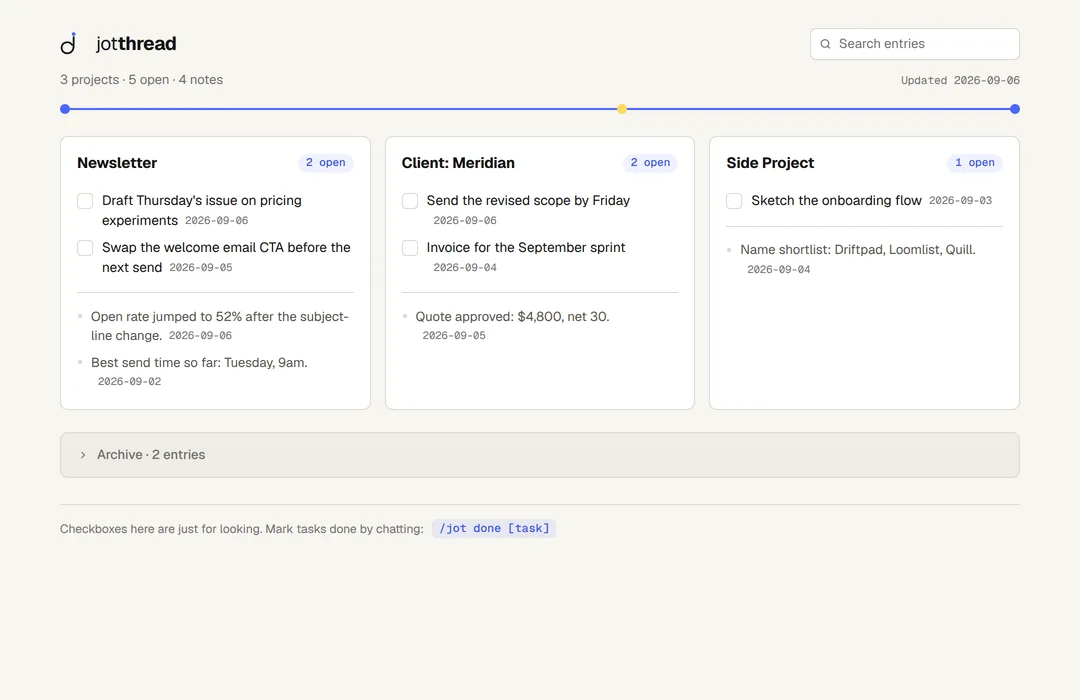
That division of labor is the design lesson for anyone building one: let the model do judgment (what's worth keeping, which project it belongs to) and let scripts do anything that must be exact (parsing, rendering, math).
Can I build my own?
Yes, and the floor is low: a folder, a SKILL.md with a clear description of when to activate, and instructions written the way you'd brief a sharp new hire. The description is the part to sweat, because it's what Claude reads when deciding whether your skill applies. Vague descriptions mean skills that never fire or fire constantly. Start with one small repeatable job you do weekly, and write down exactly how you want it done. And before building, check whether someone already has: the best skills by use case covers what's worth installing today.
Common questions
Do Claude Skills cost money?
Skills require a paid Claude plan, and script-running skills need code execution enabled. The skills themselves range from free community folders to paid products; JotThread is $29 once.
Do skills work in both Chat and Cowork?
Yes. A skill uploaded in claude.ai settings is available in both. Claude Code reads its own skills folder, which is why JotThread ships as both an upload-ready ZIP and a plain folder.
Are skills safe to install?
A skill is readable before you install it: open the SKILL.md and any scripts in a text editor and you can see exactly what it does. That transparency is one of the quiet advantages of the folder format. Only install skills from sources you trust, same as any software.
See a skill doing real work.
JotThread captures notes and tasks from your Claude conversations with one command. $29 once, no subscription.