Guide
How to save notes and tasks from Claude conversations
There are three ways to keep the decisions, numbers, and follow-ups that come up in a Claude chat: copy them out by hand, ask Claude for a summary at the end of the session, or capture them mid-conversation with a command. Here's how each works, and when each one is the right call.

I have Claude conversations all day. Product decisions get made in them, prices get settled, someone's name comes up, a follow-up gets promised. Then the conversation moves on, and a week later I'm scrolling through old chats trying to find the number we agreed on. I've been building businesses with AI in the loop for over five years, and losing things to the scrollback has been the tax on it the entire time.
The fix is one of these three methods. They go from free-and-manual to fully automatic.
Method 1: Copy it out as you go
The obvious one. Keep a notes app open next to Claude and paste things over when they matter.
It works, and it costs nothing, but it has two real problems. First, it breaks your flow: every capture is a context switch to another app, and switching is exactly when the thread of the conversation gets dropped. Second, in practice you don't do it. In the moment, everything feels memorable. The judgment of what was worth keeping only becomes obvious later, when it's gone.
Manual copying is fine for occasional Claude use. If you're in conversations daily, it quietly stops happening by Wednesday.
Method 2: Ask Claude to summarize at the end of the session
Better, and most people never think to do it. Before you close a chat, ask Claude to pull out what mattered. Here's the prompt I used for years before building something more permanent. Steal it:
This genuinely works, and it's free. Its weaknesses are the mirror image of its strength: it happens at the end, so it depends on you remembering to run it, and it produces a fresh block of text every session that still needs a home. You end up with twenty summary blocks pasted into a doc, organized by date instead of by project, which is not how you'll ever look for anything.
Method 3: Capture mid-conversation with a command
This is the version I ended up building for myself, and then shipping as a product, because the first two methods kept failing me in the same way: capture that happens later doesn't happen.
The idea is a capture command that works during the conversation. Something worth keeping comes up, you type /jot, and Claude pulls the decision or task out of the recent messages, files it under the right project in a Markdown file, and replies with one line: "Jotted under Pricing." You never leave the thread. The judgment about note versus task happens at the moment of capture, by the model that just watched the conversation happen.
JotThread is that command, packaged as a Claude Skill. Everything lands in one file, jotthread.md, organized by project with tasks and notes kept separate. When you want the overview, /thread renders the file as a board right in the chat:
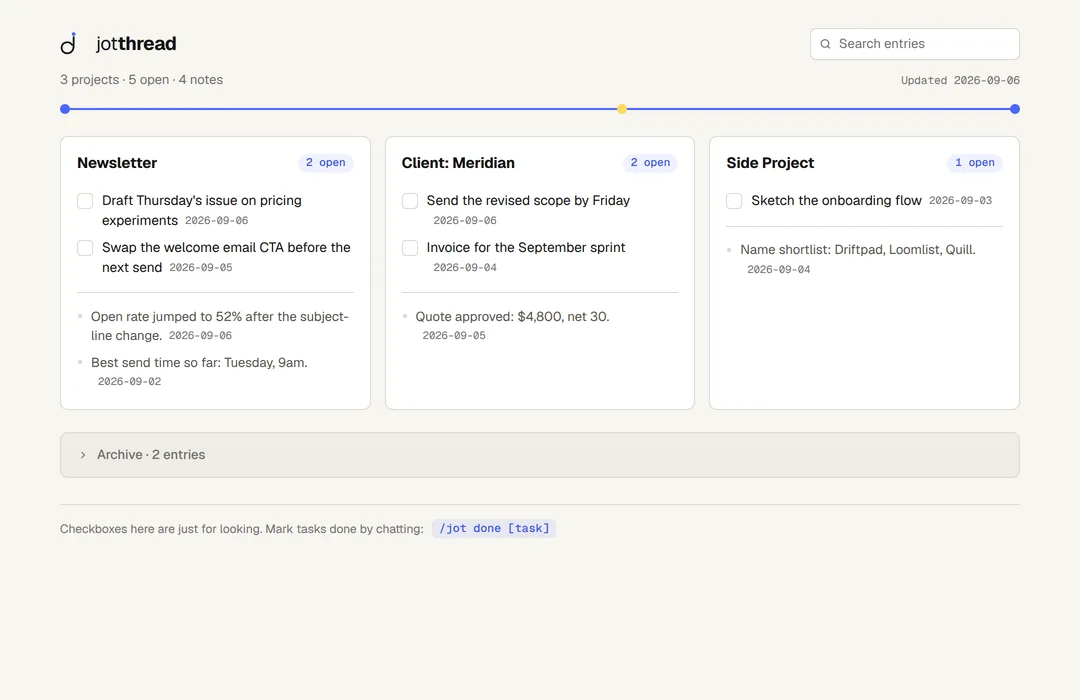
The part I care most about, after five years of tools coming and going: the file is plain Markdown. It opens in any text editor, commits to a git repo, and syncs anywhere. If JotThread disappeared tomorrow, every note would still be sitting there readable.
Which method should you use?
- Occasional Claude user: copy things out by hand. The overhead isn't worth automating.
- Regular user, zero budget: the end-of-session prompt above, plus one document you paste every summary into. Set a rule: no closing a chat without running it.
- Daily user: a mid-conversation capture command. That's JotThread, $29 once, or build your own version; the concept matters more than the product.
Common questions
Does Claude remember things between conversations?
Not in a way you control. Claude's memory and project features carry some context between chats, but they aren't a notes system: you can't open them in a text editor, organize them by project, or take them with you. If something matters, save it somewhere you own.
What's the fastest way to save something mid-conversation?
A capture command. With JotThread installed, /jot files the recent decision or task under the right project and hands back one line of confirmation. The conversation keeps moving.
Can I export my Claude conversation history instead?
Yes, Claude can export your data from settings. But an export is a transcript archive, not notes. You still have to dig the decisions out of it later, which is exactly the work you were trying to avoid.
Stop losing the good stuff.
JotThread captures notes and tasks from your Claude conversations with one command. $29 once, no subscription.